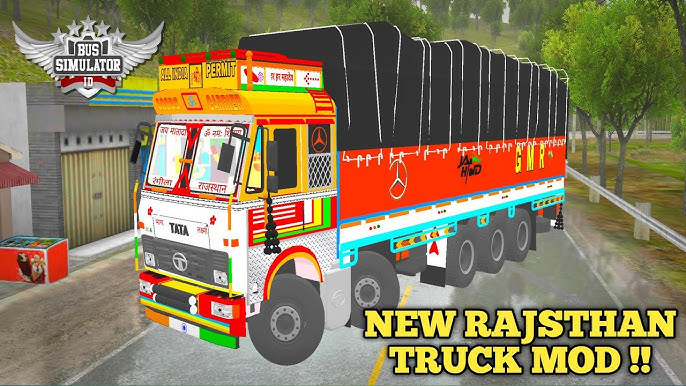
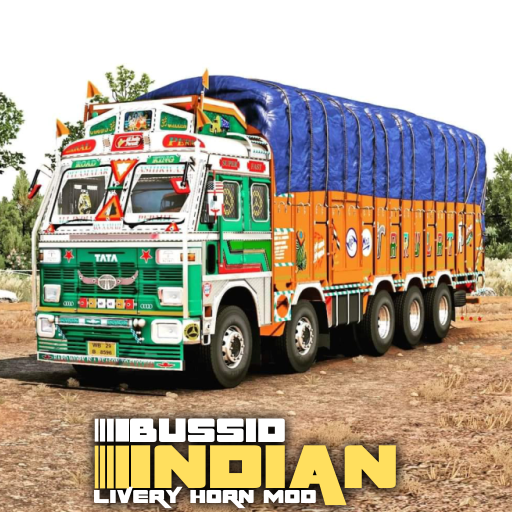
Bus Simulator Indonesia (BUSSID) has established itself as one of the most engaging and immersive simulation games available today. With its focus on authentic driving experiences and extensive customization options, BUSSID has attracted a global fanbase. One of its standout features is the ability to use mods, allowing players to introduce unique vehicles and designs into the game. For enthusiasts of Indian trucks, mods offer an unparalleled opportunity to drive some of the most iconic vehicles on Indian roads. This guide provides a step-by-step walkthrough to help you download, install, and fully enjoy Indian truck mods in BUSSID.
What Are BUSSID Mods?
Mods, short for modifications, are custom-created files that enhance or alter the game’s default settings. In the context of BUSSID, mods primarily serve to introduce new vehicles, skins, maps, and other features. Indian truck mods focus specifically on replicating the diverse and iconic trucks commonly seen on Indian roads, from heavy-duty haulers to city-friendly mini trucks.
Why Should You Try Indian Truck Mods?
Indian truck mods have gained immense popularity among BUSSID players for several compelling reasons:
- Realism: These mods are often created with painstaking attention to detail, replicating the designs, interiors, and features of real Indian trucks.
- Cultural Connection: Indian players, in particular, find these mods nostalgic and relatable, as they mirror the vehicles seen on Indian highways and streets.
- Diversity: From Tata and Ashok Leyland to Mahindra, the variety of available Indian truck mods ensures there is something for every taste.
- Customization: Most mods allow players to tweak designs, colors, and even functionality, providing a highly personalized gaming experience.
Step-by-Step Guide to Installing Indian Truck Mods in BUSSID
Follow these detailed steps to successfully download and use Indian truck mods in BUSSID:
Step 1: Finding a Reliable Mod Source
Begin by identifying trustworthy platforms to download your mods. Avoid dubious websites that might host malicious files. Popular and reliable sources include:
- Dedicated BUSSID mod websites (e.g., BUSSIDMods.com).
- Active online communities on platforms like Facebook, Reddit, or Discord.
- YouTube tutorials with direct mod download links (ensure the uploader is reputable).
Step 2: Downloading the Mod File
- Search for the Indian truck mod you want to use.
- Ensure the file format is compatible with BUSSID—usually
.bussidmodor.bussidvehicle. - Download the file to your device. Save it in a folder where you can easily locate it later.
Step 3: Moving the Mod File to the BUSSID Folder
- Open your device’s file manager application.
- Locate the downloaded mod file.
- Move or copy the file to the following directory:
Internal Storage > BUSSID > Mods. - If the Mods folder does not exist, create one manually.
Step 4: Activating the Mod in the Game
- Launch the BUSSID application on your device.
- Navigate to the “Garage” section in the game’s main menu.
- Click on the “Mods” tab to view all installed mods.
- Select your downloaded Indian truck mod and activate it by clicking “Use.”
Step 5: Test the Mod
Once activated, head to the game’s main menu and select the activated truck as your vehicle. Start a new route to test the mod’s functionality and performance.
Exploring the Features of Indian Truck Mods
Customization Options
Many Indian truck mods come with a host of customizable features that let you tailor the vehicle to your preferences. These include:
- Skins: Choose from vibrant and traditional Indian truck art or plain, professional designs.
- Functional Accessories: Add extra lights, horns, mirrors, or unique bumpers to make your truck stand out.
- Interior Details: Customize the dashboard, steering wheel, and cabin for an immersive experience.
Realistic Driving Physics
High-quality Indian truck mods often include realistic driving physics, ensuring that the trucks feel and behave like their real-world counterparts. From the weight distribution to engine power, these mods enhance the overall gameplay.
Compatibility with Indian Maps
To elevate your experience, pair your Indian truck mods with Indian-themed maps. These maps replicate iconic Indian landscapes, highways, and cities, making the driving experience even more authentic.
Tips for a Seamless Modding Experience
Stay Updated
Ensure that your version of BUSSID is up to date to avoid compatibility issues with newer mods. Regular updates often include fixes and enhancements that improve mod functionality.
Backup Your Data
Before installing mods, consider backing up your game data to prevent any potential loss or corruption. This is especially important when experimenting with multiple mods.
Avoid Overloading
While mods are exciting, overloading your game with too many mods can lead to crashes or performance issues. Limit the number of active mods and remove outdated ones.
Troubleshooting Common Issues
Mod Not Appearing in the Game
- Double-check that the mod file is in the correct directory (
BUSSID > Mods). - Ensure the file format is correct and not corrupted.
- Restart the BUSSID app after adding the mod file.
Game Performance Issues
- Lower the game’s graphic settings to improve performance.
- Use mods compatible with your device’s specifications.
- Remove mods that are causing lag or instability.
File Download Problems
- Verify your internet connection and ensure adequate storage space on your device.
- Download from reputable sources to avoid incomplete or malicious files.
Enhancing Gameplay with Indian Truck Mods
To maximize your enjoyment of Indian truck mods, combine them with additional game enhancements, such as:
- Indian Traffic Mods: Introduce Indian vehicles like autos, buses, and bikes for a more authentic environment.
- Sound Packs: Add realistic engine sounds and Indian horn effects.
- Custom Routes: Create or download routes inspired by Indian highways and streets.
Conclusion
Indian truck mods are a fantastic way to personalize your BUSSID experience and enjoy the charm of driving iconic vehicles from India. With this comprehensive guide, you’ll be well-equipped to find, install, and optimize these mods for endless hours of immersive gameplay. Whether you’re cruising down a scenic highway or navigating a bustling city street, Indian truck mods bring an unparalleled level of authenticity and fun to BUSSID. Happy driving!

Hi, this is a comment.
To get started with moderating, editing, and deleting comments, please visit the Comments screen in the dashboard.
Commenter avatars come from Gravatar.